
The configuration model
This page explains how a StoatFlow application is configured: the sources you can set values from, the order they win in, and the line between what you configure and what the engine decides for itself. It describes the model, not every key — for the exact key list and defaults, the configuration classes in the source are authoritative.
Two configuration surfaces
A StoatFlow application is configured at two layers, and it helps to keep them straight.
The engine — the :core library — is configured by a StreamsConfig object. If you build directly against :core, you construct that object yourself, in code.
Porting a Kafka Streams application onto :core doesn't mean rewriting that config from scratch. A KS-keyed Properties or Map adapts onto the same typed StreamsConfig — StreamsConfig.fromProperties(props) / fromMap(map), and new StreamsConfig(props) works directly (the KS-faithful constructor shape). The adapter covers the Kafka-Streams-4.x overlap surface — typed keys, class-name pluggables (serdes, exception handlers), and the consumer. / producer. / admin. client prefixes — and treats a key StoatFlow doesn't recognise leniently: a warning, not a failure, unless you opt into stoatflow.config.strict. StreamsConfig.toProperties() emits the resolved config back out for inspection. The KS-compatibility matrix lists the exact key coverage.
The runtime — the :runtime module, the batteries-included wrapper most applications use — adds YAML loading on top. It reads an application.yaml, maps it onto the engine's StreamsConfig, and configures its own infrastructure (the HTTP server, metrics, health checks) from the same file. This page is mostly about that runtime layer, because that's where the layering and precedence live. (Why a runtime wrapper exists at all is covered on Architecture and Features.)
The YAML splits into three top-level groups:
stoatflow:— the engine. Kafka connection, lane parallelism, commit barriers, state stores, changelog topics, watermarks, the license, and the rest of the processing behaviour.runtime:— the infrastructure wrapper. The HTTP server, Prometheus metrics, endpoint visibility, and health checks.logging:— per-logger levels, applied programmatically over whateverlogback.xmldefines.
A minimal file is short, because the defaults carry the rest:
stoatflow:
  application-id: word-count
  bootstrap-servers: ${KAFKA_BOOTSTRAP_SERVERS:-localhost:9092}

  license:
    key: ${STOATFLOW_LICENSE_KEY}

runtime:
  http:
    enabled: true
    port: ${HTTP_PORT:-8080}
  metrics:
    enabled: true
The ${VAR:-default} syntax is environment-variable interpolation with a fallback — resolve the variable, or use the value after :- when it's unset. Use it to keep deployment-specific values (broker addresses, ports, secrets) out of the committed file.
The layers, and how they stack
Configuration is resolved by overlaying several sources. A value set in a higher-priority layer overrides the same value in every layer below it. Anything no layer sets falls through to the built-in default.
From highest priority to lowest:
- Programmatic overrides — a code block passed when you construct the runtime. Applied last, so they win over everything from YAML and the environment. This is also the only layer that can carry a live object — a serde built with constructor arguments, an exception handler, a callback. YAML gets partway: it can name a class that has a no-arg constructor and let the runtime instantiate it. Anything past that exists only in code.
- Environment variables (
__separator) — the recommended form for overriding nested keys from the environment. - External overlay files — extra YAML files named via the
STOATFLOW_CONFIG_FILESenvironment variable. application.ymlon the classpath.application.yamlon the classpath.- Built-in defaults — the values baked into the configuration classes.
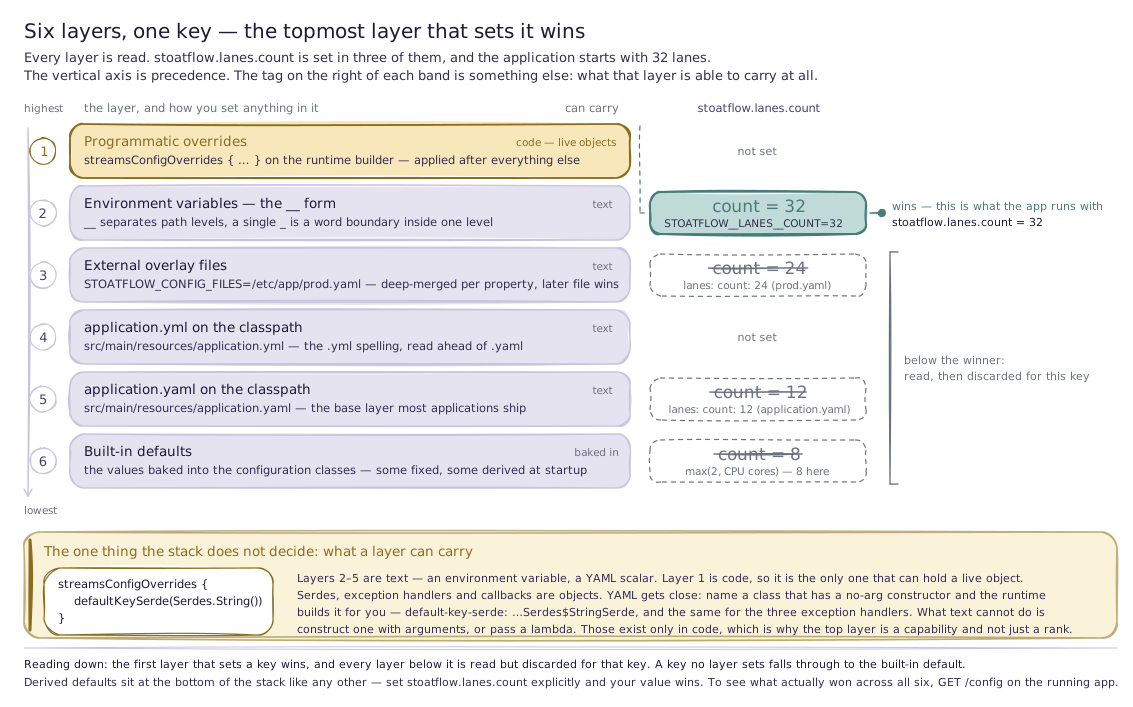
The sections below cover each layer that needs explaining.
The classpath YAML
application.yaml (or application.yml) on the classpath is the base layer. For most applications it's the only configuration file. It lives at src/main/resources/application.yaml in a typical project.
This is where you express the intended shape of the deployment — the values that are the same across every environment, with ${VAR:-default} interpolation for the handful that differ. The example below tunes lanes, the commit barrier, state, and the changelog; everything it omits keeps its default.
stoatflow:
  application-id: stock-tick-filter
  bootstrap-servers: ${KAFKA_BOOTSTRAP_SERVERS:-localhost:9092}

  lanes:
    count: 12
    queue-capacity: 1000

  commit-barrier:
    interval-ms: 200
    timeout-ms: 20000

  state:
    dir: ${java.io.tmpdir}/stoatflow/stock-tick-filter
    restoration-enabled: true

  changelog:
    enabled: true
    replication-factor: 1
    num-partitions: 6

runtime:
  http:
    enabled: true
    port: ${HTTP_PORT:-8080}
  metrics:
    enabled: true
    common-tags:
      env: development
External overlay files
Set STOATFLOW_CONFIG_FILES to a comma-separated list of file paths and the runtime merges each one over the bundled classpath YAML, at the property level — a deep merge, not a wholesale replace. A file that sets only stoatflow.bootstrap-servers overrides that one value and leaves everything else from the base file intact.
# Single overlay
STOATFLOW_CONFIG_FILES=/etc/myapp/production.yaml

# Multiple overlays — later files win over earlier ones
STOATFLOW_CONFIG_FILES=/etc/myapp/base.yaml,/etc/myapp/overrides.yaml
This is the natural fit for environment-specific layering: a base application.yaml baked into the artifact, and a per-environment overlay mounted at deploy time (a Kubernetes ConfigMap or Secret, for example). The files listed in STOATFLOW_CONFIG_FILES are required — if one is named but missing, startup fails rather than silently skipping it.
Environment variables
Any property can be set from the environment, which is what makes the YAML overridable without rebuilding the artifact. There is one naming form.
It uses __ (double underscore) as the path separator between nested keys, and a single _ for word boundaries inside a key name:
STOATFLOW__LANES__COUNT=32                          # → stoatflow.lanes.count
STOATFLOW__COMMIT_BARRIER__INTERVAL_MS=500          # → stoatflow.commit-barrier.interval-ms
RUNTIME__HTTP__PORT=9090                            # → runtime.http.port
Separating the two roles is what lets a variable name address a multi-word key like commit-barrier at all: with _ doing both jobs there is no way to tell a path boundary from a word boundary. Names are case-insensitive, and only keys under the known top-level groups (stoatflow, runtime, logging) are read.
Programmatic overrides
The highest-priority layer is a code block you pass when constructing the runtime. It's applied after YAML and environment variables are resolved, so anything it sets wins. Two reasons to use it:
- Non-serializable values. Serdes, exception handlers, and callbacks are Java/Kotlin objects, not strings. YAML can name one by fully qualified class name provided it has a no-arg constructor — see class-name configuration. Anything that needs a constructor argument, or is a lambda, has to be set here.
- Programmatic control. Anything you'd rather compute in code than spell out in YAML.
This is the streamsConfigOverrides block from Your first app — here setting the default serdes, which have no YAML representation:
val runtime = StoatFlowRuntime.fromConfig(
    topologyBuilder = { buildTopology(it) },
    configure = {
        streamsConfigOverrides {
            defaultKeySerde(Serdes.String())
            defaultValueSerde(Serdes.String())
        }
    },
)
runtime.start()
runtime.awaitTermination()
var runtime = StoatFlowRuntime.fromConfig(
    Main::buildTopology,
    builder -> builder.streamsConfigOverrides(cfg -> {
        cfg.defaultKeySerde(Serdes.String());
        cfg.defaultValueSerde(Serdes.String());
    })
);
runtime.start();
runtime.awaitTermination();
StoatFlowRuntime.fromConfig(...) loads application.yaml, applies the environment-variable layers, then runs your streamsConfigOverrides block last — so a value you set here overrides the same key from YAML or the environment.
:core directly rather than :runtime, there is no YAML layer — you construct the engine's StreamsConfig in code, which is the same surface the override block writes to. The runtime's whole job here is to load YAML and the environment, then hand control to that same builder.Why the defaults are opinionated
Most configuration keys have a default, and the defaults are chosen to make a typical application run well without tuning. Lane count defaults to the available CPU count; the commit barrier, state store sizes, changelog topic creation, and watermark behaviour all start from values that suit a common workload. The minimal two-line application.yaml works because of this — you override only the keys your deployment actually needs to change.
The intent is that configuration is subtractive: you start from a working default and adjust the few knobs your workload demands (broker address, lane count, commit-interval bounds, state directory), rather than assembling a working configuration from scratch.
Some defaults are also derived rather than fixed — they're computed from the environment at startup. Lane count, for instance, defaults to a function of the available processor count, so the same application.yaml adapts to the machine it runs on instead of pinning a number that's wrong on half your hardware. These derived defaults still sit at the bottom of the precedence stack: set the key explicitly and your value wins.
What stays automatic
Not everything that affects behaviour is a configuration key. Some of the engine's behaviour is adaptive — decided at runtime from what the workload is actually doing, rather than read from a fixed value.
The clearest example is the commit cadence. Rather than committing on a fixed timer, the runtime adjusts how often it commits based on observed runtime conditions, so the cadence tracks the workload instead of forcing you to guess a number that's right for both a quiet topic and a burst. What you configure is the envelope — bounds and intent, like the minimum and maximum interval between barriers — and the engine chooses a value inside it. The Architecture page frames this distinction: the barrier scheduling cadence and related runtime decisions are implementation concerns, and the algorithms that drive them stay in the source.
The practical consequence for configuring an application: you don't set the commit interval to a single number and hope it fits every load. You set the bounds that must hold — the slowest acceptable cadence, the fastest — and let the engine pick within them. The same philosophy shows up elsewhere in the engine, where a mode like AUTO lets the runtime detect the right setting from the topology rather than asking you to specify it. Where a knob is exposed, it's there because a deployment can reasonably need to set it; where behaviour is left automatic, it's because the engine has better information at runtime than you have at configuration time.
Inspecting the resolved configuration
Because configuration is layered, the value an application ends up running with isn't always obvious from any single file. The runtime exposes the merged, effective configuration at the /config HTTP endpoint, with sensitive values (passwords, secrets, tokens) masked. When you need to confirm what actually won across all the layers, that's the source of truth for a running instance — see the operational surface on Architecture.
Where to go next
- Architecture — the model the configuration tunes, and the runtime's full operational surface.
- Your first app — a complete
application.yamlandstreamsConfigOverridesblock in context. - Error-handling model — the failure policies you configure and what each one does.
- Features — the runtime capabilities the
runtime:group switches on.
Event time and watermarks
How StoatFlow models time — event time vs processing time, record timestamps, watermark strategies, window closing, late-record handling, and event/processing-time timers.
The error-handling model
How StoatFlow classifies failures — deserialization, processing, and production — the skip / fail / dead-letter policies you choose, DLQ semantics, and the commit failure that ends in a restart.